
Cymera – Photo Editor Collage
Screenshots
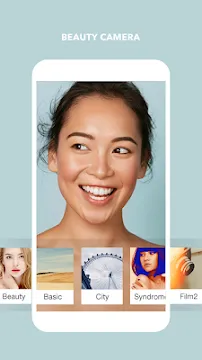
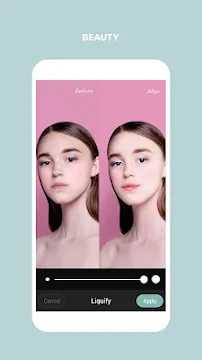

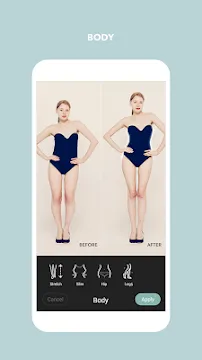
Cymera helps you capture and edit beautiful photos directly on your mobile device. Many users want a reliable photo tool that combines a powerful camera with a creative editor. This photo utility offers a complete solution for selfie lovers and photography fans alike. You can take pictures, apply live filters, and edit images easily.
Millions of users globally choose Cymera to improve their daily photography. The app provides a smooth user experience with simple navigation. Therefore, beginners can learn the editing process within a few minutes. You do not need professional editing skills to get high-quality results. This guide explores the core features, tools, and benefits of the popular photo editor.
What Makes Cymera a Popular Photo Choice
Cymera combines a feature-rich camera with advanced editing tools. Many photo editors only focus on post-processing tasks. However, Cymera gives you incredible control before you even snap the picture. The app includes seven different camera lenses to mimic professional DSLR gear. For example, you can use the divided lenses to create instant photo collages.
Additionally, the anti-shake mode helps you capture stable images on the move. You can also use a convenient timer to take hands-free group photos. Touch shot allows you to tap anywhere on the screen to capture pictures instantly. Consequently, you never miss a fleeting moment due to clumsy buttons. These unique camera options give you a massive creative advantage from the start.
Essential Features of the Cymera Camera App
Cymera offers a massive library of creative assets to transform ordinary images. You can access hundreds of free stickers, filters, and borders. The developers update these assets regularly to match modern design trends. Furthermore, the collage maker allows you to combine multiple memories into one beautiful frame. You can mix up to nine photos in a single grid layout.
The app supports custom background colors and unique border styles for your collages. You can also add text with different fonts to express your feelings. Moreover, the brush tool lets you draw custom doodles directly onto your images. This level of customization helps you create unique content for social media channels. The following list highlights the top creative tools available inside the app:
- Real-time live filters for instant previews
- Seven professional camera lenses
- Grid layouts for custom photo collages
- Trendy stickers and text options
- Blur effects for stylish background depth
Advanced Retouching Tools in the Cymera Camera App
Cymera shines brightly when you need to edit portraits and selfies. The dedicated beauty menu contains powerful tools for body and face enhancements. First, the skin smoothing feature removes blemishes, acne, and wrinkles automatically. You can adjust the intensity slider to maintain a natural look. Second, the face slimming tool helps you reshape your jawline with perfect precision.
In addition, you can enlarge your eyes to create an expressive appearance. The app even includes hair and makeup correction features. For instance, you can apply eyelashes, eyeliner, and lipstick virtually. You can also use the body shaping tool to adjust your waist or lift your hips. These smart tools analyze your body structure to apply proportional changes easily.
Creative Filters and Effects in Cymera
Cymera provides over 150 high-quality filters to change the mood of your images. The filters include popular categories like Selfie, Nation, and Vintage. You can apply these effects during live shooting or during the editing stage. Therefore, you save valuable time by previewing the style before capturing the shot. The app allows you to save your favorite filters for quick access later.
Besides standard filters, you can use light leak effects to add a nostalgic feel. Vignette controls help you darken the edges of your photo to highlight the central subject. You can also use the tilt-shift effect to simulate a miniature world look. These artistic adjustments turn simple snapshots into professional gallery pieces. Best of all, the app processes these complex effects instantly without lagging.
Seamless Sharing and File Management
Cymera simplifies the process of organizing and sharing your edited masterpieces. The built-in gallery sorts your images by date and location automatically. Thus, you can find specific photos without scrolling through thousands of messy files. The app supports secure cloud storage backup options to protect your precious memories. You will never lose your artwork if your device gets damaged.
Sharing your creations with friends is incredibly fast and simple. The app connects directly to popular social networks like Instagram, Facebook, and WhatsApp. You can export your photos in high-resolution formats to keep the quality crisp. Furthermore, the app allows you to resize images to fit specific social media banner requirements. This direct integration makes the tool perfect for active content creators.
Conclusion
Cymera provides an excellent combination of camera lenses, beauty tools, and creative filters. The app solves your mobile photography challenges by offering an all-in-one editing suite. You can capture stable shots, smooth your skin, and add stylish text within one interface. Because the design is highly intuitive, anyone can create beautiful visuals immediately. Short sentences and clear menus ensure a frustration-free experience for every user level. Download Cymera today to upgrade your creative photo collection.